Install And Configure phpMyAdmin In Ubuntu Karmic Koala (9.10)

This time we will discuss how the installation and configuration of phpmyadmin on ubuntu karmic koala (9.10), phpmyadmin is application web interface to manage database, like MySQL, php and etc. to install phpmyadmin in ubuntu karmic koala, follow these steps :


Go to terminal login as root by type :

$ sudo su
$ apt-get install phpmyadmin

Edit file apache2.conf in directory /etc/apache2/ by type :
$ gedit /etc/apache2/apache2.conf

Alias /moodle "/usr/share/phpmyadmin/"

(Directory "/usr/share/phpmyadmin//")
<
AllowOverride None
Options Indexes MultiViews
AddHandler type-map var
Order allow,deny
Allow from all
LanguagePriority en cs de es fr it nl sv pt-br ro

(/Directory)

Change sign () by <>

Open web browser and type : http://localhost/phpmyadmin, now you can see phpmyadmin interface. for more complete data base management on the web interface, you can install xampp here or here

Happy Testing...!!
Read More...!!

Install Open Office 3.2.0 in Ubuntu Karmic Koala (9.10)

Openoffice 3.2.0 has been released, in ubuntu karmic koala (9.10) you can be installed this version by downloading package here. if .deb packages have downloaded, follow these steps :


Go to terminal and login as root by type :


$ sudo su

Extract file have you downloaded by type :

$ tar xzvf OOo_3.2.0_LinuxIntel_install_en-US_deb.tar.gz

There is an old package that must be uninstalled before installing open office version 3.2.0 is : OOO320_m12_native_packed-1_en-US.9483, if you want to remove older version by type :


$ apt-get remove openoffice*.*

Go to extracted directory OOO320_m12_native_packed-1_en-US.9483/DEBS/ and install all packages by type :


$ dpkg -i *.deb

Go to directory OOO320_m12_native_packed-1_en-US.9483/DEBS/desktop-integration/ install openoffice.org3.2-debian-menus_3.2-9472_all.deb for menu on Application by type :


$dpkg -i openoffice.org3.2-debian-menus_3.2-9472_all.deb

For new feature, check here
Finish And Happy Testing...!!
Read More...!!

Upgrade PulseAudio 0.9.21 in Ubuntu Karmic Koala (9.10)

PulseAudio on ubuntu karmic koala (9.10) by default installed version 0.9.20, the latest version of PulseAudio is 0.9.21, in this version of the existing bugs in previous versions have been fixed to upgrade to the latest version is 0.9.21 follow these steps :


Go to terminal, login as root and add PPA repository by type :

$ sudo su

$ add-apt-repository ppa:ubuntu-audio-dev/ppa

Update repository and Upgrade PulseAudio by type :

$ apt-get update && sudo apt-get dist-upgrade

After finish, now you have latest version of PulseAudio.

Happy Testing...!!
Read More...!!

Install System Wide PulseAudio Equalizer On Ubuntu Karmic Koala (9.10) Lucid Lynx (10.04)

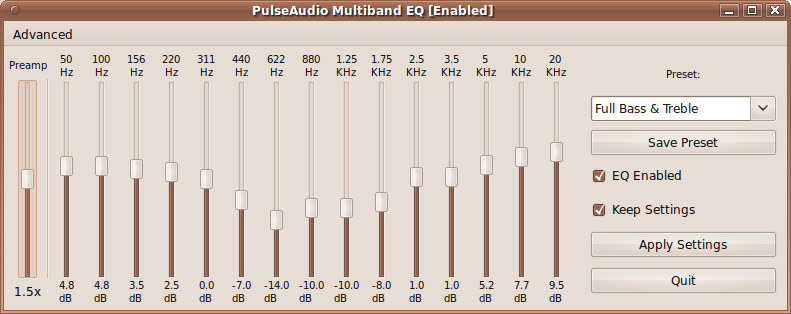
System wide equalizer in the development of PulseAudio PulseAudio for clearer sound developed by psyke83, now on ubuntu karmic koala (9.10) and ubuntu lucid lynx can be installed by adding the PPA, to install it follow these steps :


Login as root by type :

$ sudo su

Add PPA repository :

$ add-apt-repository ppa:psyke83/ppa

Update repository by type :

$ apt-get update

Then install system wide PulseAudio by type :

$ apt-get install pulseaudio-equalizer

Finish and Happy Testing...!!
Read More...!!

Diasble File Browser Password in Ubuntu Karmic (9.10) and Jaunty (9.04)

In ubuntu karmic koala (9.10) and jaunty jackalope (9.04) when we using file browser to find ore open file we always ask for root password to acces file browser, to disable it follow this steps :


Open Terminal and login as root by type :

$ sudo su

Edit file org.freedesktop.devicekit.disks.policy by type :


$ gksudo gedit /usr/share/polkit-1/actions/org.freedesktop.devicekit.disks.policy

Find this line :

<allow_active>auth_admin_keep</allow_active>

And change it to :

<allow_active>yes</allow_active>

Save and restart your machine, Happy Testing....!!
Read More...!!