Showing posts with label Desktop. Show all posts

Jawaban UTS Sistem Operasi

Jawaban UTS Sistem Operasi 

Rahadian Syarif
18020046
3A Karyawan


1. Jelaskan perbedaan antara sistem operasi dan program aplikasi
Gambar 1.1 Icon Sistem Operasi

Sistem Operasi yang  biasa disebut (Operating System) atau yang biasa disingkat OS, iyalah perangkat lunak (software) sistem yang berfungsi melakukan pengontrolan dan manajemen perangkat keras (hardware) serta operasi-operasi dasar dari suatu sistem Komputer.

Program aplikasi pada komputer merupakan perangkat lunak siap pakai yang nantinya akan digunakan untuk membantu melaksanakan pekerjaan penggunanya.Dalam sebuah komputer aplikasi ini disiapkan sesuai kebutuhannya masing-masing.

Contohnya: adalah ketika kita menjalankan Corel Draw diperlukan ram, vga, dll yg berjalan di sistem operasi windows maupun linux dll.


2. Jelaskan Apa yang disebut dengan open source dan berikan contoh sistem operasi yang menggunakan sistem tersebut.

Gambar 2.1 Open Source

Open source adalah sistem pengembangan yang tidak dikoordinasi oleh suatu individu / lembaga pusat, tetapi oleh para pelaku yang bekerja sama dengan memanfaatkan kode sumber (source-code) yang tersebar dan tersedia bebas (biasanya menggunakan fasilitas komunikasi internet).

Contoh : Ubuntu, Mandriva, Android, One UI, Backtrack, Mint dll


3. Apa Kelebihan Sistem Operasi Windows, Linux, Mac dan Android
Gambar 3.1 Sistem Operasi

Kelebihan Windows :
  • GUI yang familiar sehingga pengguna lebih nyaman berada didepan layar monitor
  • Dukungan perangkat dari driver yang lebih baik
  • Banyak aplikasi kantor yang kompatibel dengan windows
  • Mudah untuk digunakan, karena para pengguna sudah terbiasa dengan tampilan windows

Kelebihan Linux :
  • Open source
  • Lebih “kebal” virus
  • Aplikasi bawaan relatif lengkap
  • Driver relatif lengkap
  • Software center yang relatif mumpuni
  • User interface yang refreshing
  • Tampilan menuntut adaptasi
  • Aplikasi relatif sedikit apabila dibandingkan dengan sistem operasi lain

Kelebihan Mac :
  • Kestabilan lebih baik karena menggunakan UNIX
  • Mac OS ini merupakan sebuah system operasi exclusif untuk Mac, maka kualitas dan support kedepannya lebih terjamin.
  • Mudah digunakan dan apabila kesulitan dapat terdapat pula training centrenya
  • Lebih aman dari gangguan virus, Spyware dll. Oleh sebab itu produk Mac menjadi sebuah pilihan bagi mereka yang sudah kesal dengan namanya virus.
  • Mac OS juga memiliki fitur yang namanya “Sherlock” program ini tidak hanya mencari di internal hardisk saja, tetapi di internet juga sesuai keyword yang diinginkan.
  • Sulit dibajak
  • Dokumen yang diolah pada Mac dapat dibaca pada OS lain, begitu pula sebaliknya.
  • Untuk tampilan tidak perlu diragukan lagi, Mac OS memang selalu memberikan tema yang smoth dan indah.

Kelebihan Android : 
  • Merupakan sistem operasi open source, sehingga mudah dikembangkan oleh developer handset
  • Mudah dikustomisasi dan dimodifikasi
  • Perangkat android memiliki harga yang beragam, dari yang termurah hingga termahal
  • OS android dapat dijalankan pada banyak pilihan spesifikasi hardware
  • Dukungan aplikasi yang sangat banyak dan beragam
  • Mudah dipahami, sehingga dapat diperbaiki apabila mengalami kerusakan sistem
  • Dapat diaplikasikan di banyak peralatan elektronik
  • Dikembangkan oleh salah satu raksasa telekomunikasi dunia, yaitu Google
  • Merupakan salah satu sistem operasi yang cepat dan responsive

4. Gambarkan dengan lengkap susunan memory, dan jelaskan apa yang dimaksud dengan cache memory

Gambar 4.1 Susuan Lengkap Memory

Cache adalah memory berukuran kecil yang sifatnya temporary (sementara). Walaupun ukuran filenya sangat kecil, namun kecepatannya sangat tinggi. Dalam terminologi hardware, istilah ini biasanya merujuk pada memory berkecepatan tinggi yang menjembatani aliran data antara processor dengan memory utama (RAM) yang biasanya memiliki kecepatan jauh lebih rendah

5. Jelaskan metode pemodelan analisis model dan simulasi
Gambar 5.1 Kekurangan dan Kelebihan Model Analisis dan Simulasi

Metode Analisis Model Antrian :
Menggunakan teori antrian untuk menemukan kombinasi algoritma mana yang paling efisien. Metode ini menggunakan teori yang rumit

Metode Simulasi : Dibuat simulasi berukuran kecil bagi pekerjaan yang besar. Metode ini lebih cepat karena ukuran keil pada simulasi.

6. Gambarkan diagram penjadwalan dan jelaskan dari masing-masing penjadwalan
Gambar 6.1 Diagram Penjadwalan Prosesor

  • Penjadwal jangka pendek (short term scheduller) Bertugas menjadwalkan alokasi pemroses di antara proses-proses ready di memori utama Penjadwalan dijalankan setiap terjadi pengalihan proses untuk memilih proses berikutnya yang harus dijalankan.

  • Penjadwal jangka menengah (medium term scheduller) Setelah eksekusi selama suatu waktu, proses mungkin menunda sebuah eksekusi karena membuat permintaan layanan masukan/keluaran atau memanggil suatu system call. Proses-proses tertunda tidak dapat membuat suatu kemajuan menuju selesai sampai kondisi-kondisi yang menyebabkan tertunda dihilangkan. Agar ruang memori dapat bermanfaat, maka proses dipindah dari memori utama ke memori sekunder agar tersedia ruang untuk proses-proses lain. Kapasitas memori utama terbatas untuk sejumlah proses aktif. Aktivitas pemindahan proses yang tertunda dari memori utama ke memori sekunder disebut swapping. Proses-proses mempunyai kepentingan kecil saat itu sebagai proses yang tertunda. Tetapi, begitu kondisi yang membuatnya tertunda hilang dan dimasukkan kembali ke memori utama dan ready.

  • Penjadwal jangka panjang (long term scheduller) Penjadwal ini bekerja terhadap antrian batch dan memilih batch berikutnya yang harus dieksekusi. Batch biasanya adalah proses-proses dengan penggunaan sumber daya yang intensif (yaitu waktu pemroses, memori, masukan/keluaran), program-program ini berprioritas rendah, digunakan sebagai pengisi (agar pemroses sibuk) selama periode aktivitas job-job interaktif rendah.

7. Berikan penjabaran tiga metode evaluasi terhadap algoritma penjadwalan

Gambar 7.1 Penjadwalan Proses

  • Pemodelan deterministik : Pemodelan deterministik merupakan evaluasi analitis. Evaluasi analitis menggunakan algoritma dan beban kerja sistem untuk menghasilkan satu rumus atau angka yang menunjukkan kinerja algoritma untuk beban kerja itu. Pemodelan deterministik menggunakan suatu beban kerja tertentu yang telah ditentukan dan mendefinisikan kinerja algoritma untuk beban kerja itu.
  • Pemodelan antrian : Sistem komputer dipandang sebagai satu jaringan pelayan (server). Masing-masing pelayan mempunyai satu antrian dari proses-proses yang menunggu layanan. Pemroses adalah satu pelayan dengan satu antrian proses yang siap menerima layanan, begitu juga perangkat I/O adalah antrian perangkat. Dengan mengetahui rate kedatangan dan rate layanan, maka kita dapat mengkomputasi utilisasi, panjang antrian rata-rata, waktu tunggu rata-rata dan sebagainya. Bidang studi ini adalah analisis jaringan antrian (queueing network analysis).
  • Simulasi : Simulasi dapat memberikan evaluasi algoritma penjadualan dengan lebih akurat. Simulasi melibatkan pemrograman model system komputer. Dengan simulasi akan diperoleh statistik yang menyatakan kinerja algoritma.


Read More...!!

Remove Gnome Panel in Ubuntu Maverick Meerkat (10.10)

In this post, we will discuss for removing gnome-panel in ubuntu maverick by using gconf-editor, it really just to create variations on your Ubuntu desktop. for removing gnome-panel in ubuntu maverick, open terminal, then open gconf-editor with the command:


$ gconf-editor

Go to :

desktop > gnome >session > required components

And search for "gnome-panel" value, then remove gnome-panel, restart your computer and gnome-panel will be removed. then you can replace it by using the dock applications, such as "kiba-dock, AWN, and cairo dock" to beautify your Ubuntu desktop display. good luck
Read More...!!

Restore Default GNome Panel in Ubuntu Lucid Lynx (10.04)

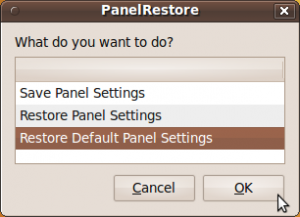
An easy way to restore gnome-panel in ubuntu Lucid Lynx is to use the restore panel program, which is a small scripting program that can help you to restore gnome panel by default. to restore this panel, you can download here

When finished downloading, extract the file, then double-click, the selection window will appear. select "Run" 


Select "restore defaut setting panel" then press OK. Gnome panel will change by default the same as when you first install. if there is still no change, restart your computer. good luck
Read More...!!

Compose Music Using TuxGuitar in Ubuntu

For ubuntu users who like music or a musician TuxGuitar can help you to compose music, tuxguitar has the following features:


With TuxGuitar, you will be able to compose music using the following features

  • Tablature editor
  • Score Viewer
  • Multitrack display
  • Autoscroll while playing
  • Note duration management
  • Various effects (bend, slide, vibrato, hammer-on/pull-off)
  • Support for triplets (5,6,7,9,10,11,12)
  • Repeat open and close
  • Time signature management
  • Tempo management
  • Imports and exports gp3,gp4 and gp5 files
You can install by downloading the tuxguitar package, here.
Read More...!!

Design Your Own Home In Ubuntu Using Sweet Home 3D

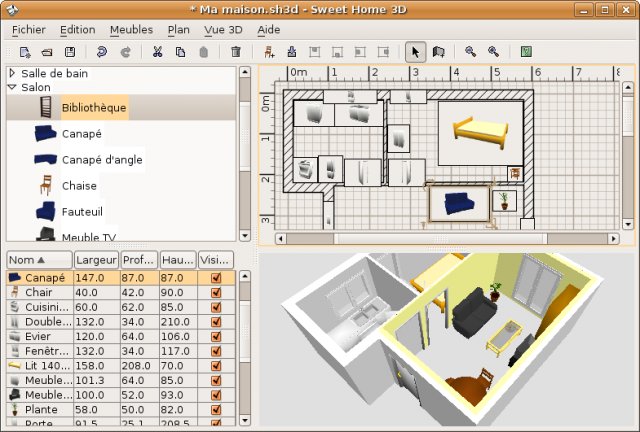
Design your own home in ubuntu? not a dream. because there is an application sweet home 3d. nah, this application helps you to design your own home, both in terms of exterior and interior.  


Here you can design your own home model, many different features such as: designing the aquarium, bedroom, kitchen and living room. dapt you install this application to download it  

http://www.sweethome3d.com/download.jsp

And below are examples :


Read More...!!

Install VLC player In Ubuntu Lucid Lynx (10.04)

Actually, installing VLC on ubuntu is Lucid very easy and probably, all Ubuntu users already know. but for you who do not know, I think it's nice to see and read this posting. to install VLC player in ubuntu Lucid lynx, follow these steps:


Go to terminal and login as root by type :

$ sudo su

Now add vlc repository from ppa by type :

$ add-apt-repository ppa:n-muench/vlc

Update and install it by type :

$ apt-get update
$ apt-get install vlc vlc-plugin-pulse mozilla-plugin-vlc

Now after finished you can watch the video using vlc player. Happy Testing....
Read More...!!

Perfect Desktop Ubuntu Lucid Lynx (10.04) Using Elementary

For you who like look of ubuntu desktop and for variation of the theme and icon. you can try elementary theme. This actually is a common theme, but if you add other features like a dock and globus preview can be perfect desktop and you will be like it. now you can install elementary theme, include elementary-theme, elementary-icon dan elementary-wallpaper.

To install elementary themes you must add third party repository, login as root by type :

$ sudo su
$ gedit /etc/apt/source.list

Add this line :

deb-src http://ppa.launchpad.net/elementaryart/ppa/ubuntu lucid main

Update repository by type :

$ apt-get update

To install elementary theme, using synaptic packages manager. go to System > Administration > Synaptic Package Manager and quick search (elementary-theme, elementary-icon dan elementary-wallpaper) then check list it then click "apply to install" wait until install finished.


Now you can use this them, by "Right Click on the Desktop > Change Desktop Background and Choose Appreance click elementary and customize it. then close. 


Now elementary has installed on your desktop. Happy Testing.....
Read More...!!

Install Limewire In Ubuntu Lucid Lynx (10.04)

Limewire is sharring program applications, to get instant access to thousands of files are exclusive, including new songs, new movies, new games and much more. Limewire is a leader when it comes for file sharing. Known as free applicarions best peer to peer (p2p) to install free limewire version 5.5.8 in ubuntu lucid lynx (10.04)  you can add third party repository and download packages here....!! login as root and add this line :


$ sudo su
$ gedit /etc/apt/sources.list
deb http://archive.canonical.com/ lucid partner

Update sources by type :

$ apt-get update 

Then install it by double click and this packages need more packages and will downloadede automatically if you have added the third party repo's. now Limewire 5.5.8 have succesfully installed.

Happy Testing.....!!!
Read More...!!

Change And Customize Grub Loader in Ubuntu Lucid Lynx (10.04) Using Burg-Manager

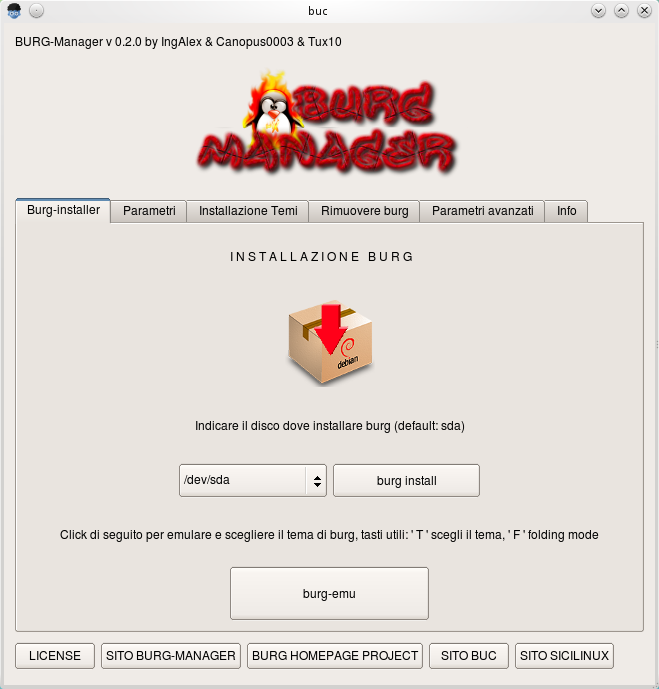
Here to replace grub loader still collor black white and text mode, to beautiful theme you can change it using burg-manger, to install download here then add third party repository, login as root by type :

$ sudo su
$ gedit /etc/apt/sources.list

Add this line then update and install :

deb http://buc.billera.eu/ubuntu/ binary/
sudo gedit /etc/apt/sources.list

$ apt-get update
$ apt-get install buc

Then install burg-manager pack package :


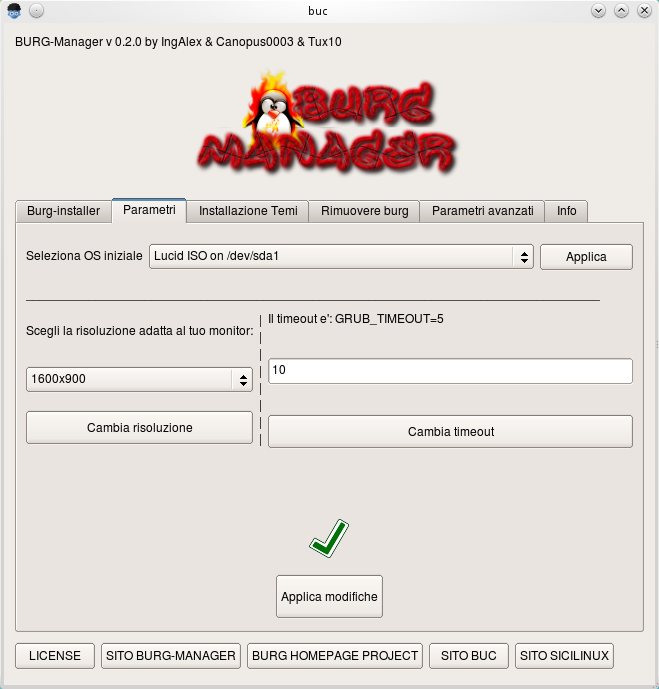
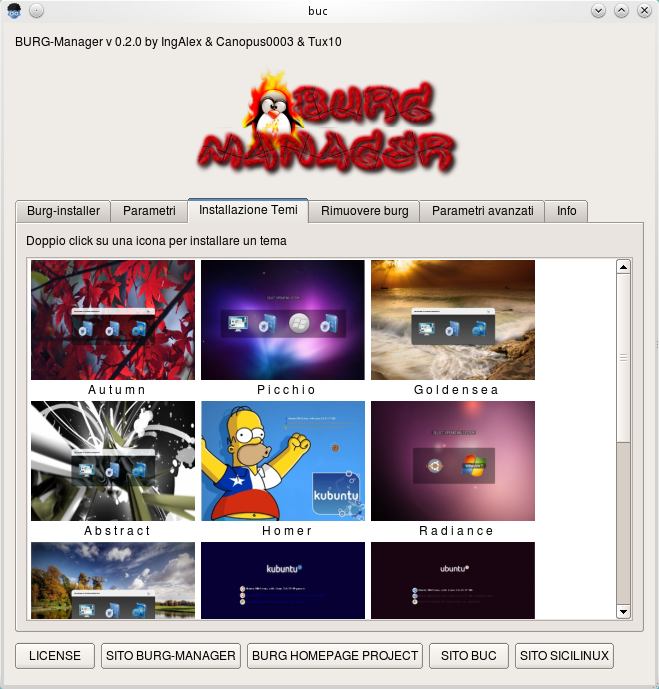
After installed, go to application > Systems Tools > burg manager then type your root password then select theme...

Happy Testing....

Sources :

http://buc.intilinux.com/wiki/index.php?title=Installare_BUC_tramite_repository
http://buc.billeragroup.net/?page_id=15
Enhanced by Zemanta
Read More...!!

Install F-Spot 0.7.1 In Ubuntu Lucid Lynx (10.04)

F-spot is photo application manager for Gnome desktop full feature personal photo management. you can manage personal photo use this application very simple and easy. to install it follow these steps :


$ sudo su
$ add-apt-repository ppa:f-spot/f-spot-ppa

Then update and install

$ apt-get update
$ apt-get install f-spot

And finish, now you can manage personal photo with full features of this application. if you want to install offline. just download here : http://f-spot.org/Main_Page

Happy Testing....!!!
Read More...!!

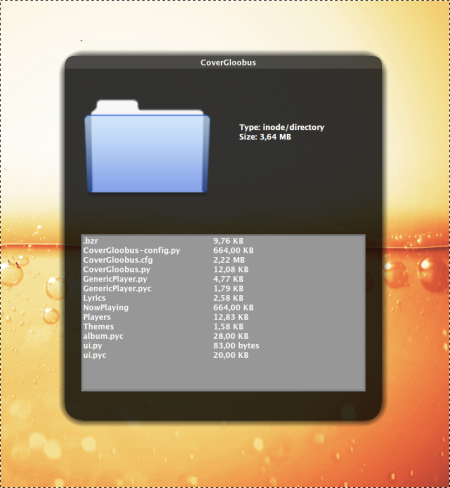
Quick Look File Using Globus Preview In Ubuntu Lucid Lynx (10.04)

To view some files or folders on your hard disk much hassle of having to open the folder one by one. here for qiuck look file to search and open file qickly using globus preview. to install it, add reposirtory. go to terminal and login as root :


$ sudo su
$ sudo add-apt-repository ppa:gloobus-dev/gloobus-preview

Update and install

$ apt-get update
$ apt-get install gloobus-preview

Now you can quick look file into folder just press "spacebar" on file manager, then you can view the contents of  folder.

Happy Testing...!!
Read More...!!

Install Cairo Dock In Ubuntu Lucid Lynx (10.04)

Cairo-Dock is a unified interface to your desktop : it provides a dock, a taskbar, and many applets that can be placed either inside the dock or on your desktop, at your convenience ! It uses Cairo / OpenGL to render nice graphics with hardware acceleration, which makes it very smooth and low on CPU. It's highly customisable and comes with a lot of ready-to-use themes.
 

To install it, we need third party repository. login as root :

$ sudo su
$ add-apt-repository ppa:cairo-dock-team/ppa

Then update and install by type :

$ apt-get update
$ apt-get install cairo-dock

If have finished, go to Applications > System Tools > GLX-Dock, then costumize your setting.
Happy Testing....!!
Read More...!!

Playing Music On Ubuntu Terminal Using MOC (Music On Console)

MOC (music on console) is a console audio player for LINUX/UNIX designed to be powerful and easy to use. You just need to select a file from some directory using the menu similar to Midnight Commander, and MOC will start playing all files in this directory beginning from the chosen file. 
There is no need to create play lists like in other players. Supported file formats are: mp3, Ogg Vorbis, FLAC, Musepack, Speex, WAVE, AIFF, AU (and other less popular formats supported by libsndfile. New formats support is under development.


To install it add third party repository go to terminal, login as root by type :

$ sudo su
$ gedit /etc/apt/sources.list

Add following line 

deb http://www.lxtec.de/debarchiv unstable main
deb-src http://www.lxtec.de/debarchiv unstable main

$ apt-get update
$ apt-get install moc

If firts steps fail you can download this packgaes here....
Read More...!!

Install GnoMenu 2.8 In Ubuntu Lucid Lynx (10.04)

GnoMenu  A consolidated menu for gnome that brings eye candy to the world of the Gnome menu's. Fully functional menu , supports themes , for a composited or non composited desktop. It can emulate the look and feel of the most beautiful menus of most modern desktops, and it can also custom menus, due to its powerful theme XML engine. Latest version GnoMenu is 2.8. To install it, go to terminal, login as root by type :


$ sudo su

Add third party repository and update :

$ add-apt-repository ppa:gnomenu-team/ppa
$ apt-get update

Then install it, by type :

$ apt-get install gnomenu

To customize it, right click to panel > add to panel > select gnomenu and add other you like. and finish....!! more info about GnoMenu visit : http://gnomenu.blogspot.com/

Happy Testing...!!
Read More...!!

Install And Upgrade Amarok 2.3.1 In Ubuntu Lucid Lynx (10.04)

Amarok is best music player on ubuntu, you can install it with simple way, login as root and add third party repository by type :


$ sudo su
$ add add-apt-repository ppa:kubuntu-ppa/backports

Update Repository, and install it by type :

$ apt-get install amarok

If you have installed old version, you can upgrade it by type :

$ sudo apt-get update && sudo apt-get upgrade

To play mp3 music  intall this packages :

$ apt-get install kubuntu-restricted-extras

Sources: http://ubuntudoctor.com/content/video/06/Amarok-2.3.1-Installation-on-Ubuntu-10.04

Happy Testing...!!
Read More...!!

Desktop Background Video In Ubuntu Lucid Lynx (10.04)

You can change ubuntu desktop background using video, this is maybe old trick. But if you're new  to know it hopefully useful. We need to install some packages : zenity, mplayer dan xwinwrap. go to terminal, login as root by type :

$ sudo su
$ apt-get install zenity mplayer

Then donwload xwinwrap here....!!. Extract this package and move to /usr/bin/ open /usr/bin/ and run i-winwrap then you can see window here :


Select movie to using it as desktop background, choose video  for your desktop background, and will appeaer option to play sound next you can set tranparency video by loop and finish...

Happy Testing.....!!!
Read More...!!

Change USplash Boot Screen In Ubuntu 10.04 Lucid Lynx

Here thread from ubuntuguide to change Usplash boot screen in Ubuntu lucid lynx (10.04), USplash is splash screen will see when we booting for ubuntu. here ways to change it :


Go to terminal and login as root bye type :


$ sudo su

Install startup manager by type :

$ apt-get install startupmanager

Start it, go to System -> Administration -> Startup Manager

You can set it.

Happy Testing...!!

Read More...!!

Change Login Screen On Ubuntu Lucid Lynx (10.04)


Here to change login screen on ubuntu Lucid Lynx (10.04), directly go to terminal and login as root by type :

$ sudo su

Copy gnome-appearance-properties.desktop to /usr/share/gdm/autostart/LoginWindow by type :

$  cp /usr/share/applications/gnome-appearance-properties.desktop /usr/share/gdm/autostart/LoginWindow

Close terminal and logout on your system, after loged out Appearance window will pop up, to block apperance go to terminal and type :

$ unlink /usr/share/gdm/autostart/LoginWindow/gnome-appearance-properties.desktop

Dont Forget login as root, now install Plymouth theme by type :

$ apt-get install plymouth-theme-*

Now you can run the following commands to change login and plymouth screens :

$ update-alternatives --config default.plymouth

$ gksu -u gdm dbus-launch gnome-appearance-properties

Happy Testing...!!
Read More...!!

Install aTunes Music Player In Ubuntu Karmic Koala

aTunes is a full-featured audio player and manager, developed in Java programming language, so it can be executed on different platforms: Windows, Linux and Unix-like systems, Currently plays mp3, ogg, wma, wav, flac, mp4 and radio streaming, allowing users to easily edit tags, organize music and rip Audio CDs. to install it, just download deb package Here and install :


$ sudo su

$ dpkg -i atunes_1.13.3-1_all.deb

Or just double-klik on deb packages, to run aTunes. Go to Application > Sound & Video and choose aTunes.

Happy Testing...!!

Sources :

http://www.atunes.org/
Read More...!!

Solve Amarok Problem On Ubuntu Karmic Koala (9.10)

Amarok is the best music player application on linux operating system, including ubuntu, but in this version, amarok have a little problem, after the application is installed by default can not play music even though the codec is a multimedia/gstreamer is already installed. turns out this problem because there is a package that has not been installed, do not know why? this package is not installed directly at the installation process, the package is needed is:


libxine1-ffmpeg

after the problem is found, we only install the package using terminal n login as root by type :

$ sudo su
$ apt-get install libxine1-ffmpeg

Finish...!!

Open amarok and lets play your favourite music and happy testing...!!
Read More...!!