Easy Way Fix Problem Grub Rescue On Windows 7 (Maverick Meerkat) Using Burg Manager

I've had problems with grub ubuntu, when I select the booting windows 7, it turns out there is a message "grub rescue". and I can not boot through windows 7, I finally took the initiative to check it through ubuntu. after I see it, it turns out that the partition in the grub list, is on sda3, however, the partition is on sda2. after I change to use:


$ sudo gedit /boot/grub/grub.cfg

There was still a "grub rescue", after that, I try to update the grub with the command :

$ sudo update-grub

After running the command above, the problem has not been fixed, and still can not boot windows 7. Then i try to delete grub ubuntu, go to grub rescue on windows 7 :

bcdedit /export C:\BCD_Backup
C:
CD Boot
Attrib bcd –s –h –r
ren c:\boot\bcd bcd.old
bootrec /RebuildBcd 

Then appear Messages :

“Scanning all disks for windows installations.
Please wait, since this may take a while…
Successfully scanned windows installations: 1
[1] C:\windows
Add installations to boot list? Yes(y)/No(N)/All(A) : “

And Press Y Enter

Then  : 

bootrec /fixmbr 
bootrec /FixBoot

After Finished, Grub is gone, but still can't booting from Window 7. Now, i finaly found solution from this problem.

Install Burg Manager.  from here or here, after installing burg manager, you will see message, An explanation more or less like this:  " i can fix this problem, problem is fixed "

Then you can booting from Windows 7. i finally found this solution by two day.
Read More...!!

Remove Gnome Panel in Ubuntu Maverick Meerkat (10.10)

In this post, we will discuss for removing gnome-panel in ubuntu maverick by using gconf-editor, it really just to create variations on your Ubuntu desktop. for removing gnome-panel in ubuntu maverick, open terminal, then open gconf-editor with the command:


$ gconf-editor

Go to :

desktop > gnome >session > required components

And search for "gnome-panel" value, then remove gnome-panel, restart your computer and gnome-panel will be removed. then you can replace it by using the dock applications, such as "kiba-dock, AWN, and cairo dock" to beautify your Ubuntu desktop display. good luck
Read More...!!

Restore Default GNome Panel in Ubuntu Lucid Lynx (10.04)

An easy way to restore gnome-panel in ubuntu Lucid Lynx is to use the restore panel program, which is a small scripting program that can help you to restore gnome panel by default. to restore this panel, you can download here

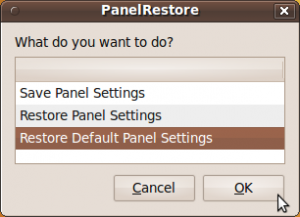
When finished downloading, extract the file, then double-click, the selection window will appear. select "Run" 


Select "restore defaut setting panel" then press OK. Gnome panel will change by default the same as when you first install. if there is still no change, restart your computer. good luck
Read More...!!

Install Libre Office In Ubuntu Maverick Meerkat (10.10)

To install Libre office in ubuntu 10.10 you must add third party repository, no go to terminal, login as root by type :


$ sudo su

Add third party repository, copy this command :

$ echo 'deb http://download.tuxfamily.org/gericom/libreoffice /' | sudo tee -a /etc/apt/sources.list

Get key server by type :

$ sudo apt-key adv --keyserver keyserver.ubuntu.com --recv-keys 890E7A26

Update repository and install libre office by type :

$ apt-get update
$ sudo apt-get install libreoffice3* lobasis3.3*

Now libre office has installed on your ubuntu 10.10
Read More...!!

Watch Thousands of TV channels and Streaming Video on the Internet for Free Using Miro in Ubuntu

Miro is a free program HD video player. It can play almost any video files and offers more than 6,000 free Internet TV and video podcasts.  Miro is pretty simple interface designed for HD video fullscreen. Quite simply, Miro is a better way to watch all the videos you care.  This application is a free open-sources and developed by volunteer organizations throughout the world.


You can view the installation instructions at :

Read More...!!