Install System Wide PulseAudio Equalizer On Ubuntu Karmic Koala (9.10) Lucid Lynx (10.04)

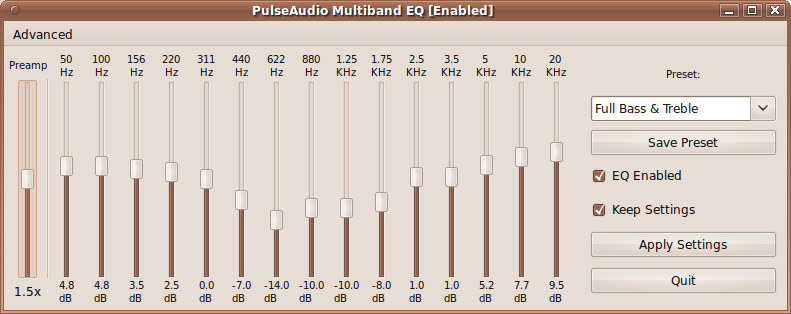
System wide equalizer in the development of PulseAudio PulseAudio for clearer sound developed by psyke83, now on ubuntu karmic koala (9.10) and ubuntu lucid lynx can be installed by adding the PPA, to install it follow these steps :


Login as root by type :

$ sudo su

Add PPA repository :

$ add-apt-repository ppa:psyke83/ppa

Update repository by type :

$ apt-get update

Then install system wide PulseAudio by type :

$ apt-get install pulseaudio-equalizer

Finish and Happy Testing...!!
Read More...!!

Diasble File Browser Password in Ubuntu Karmic (9.10) and Jaunty (9.04)

In ubuntu karmic koala (9.10) and jaunty jackalope (9.04) when we using file browser to find ore open file we always ask for root password to acces file browser, to disable it follow this steps :


Open Terminal and login as root by type :

$ sudo su

Edit file org.freedesktop.devicekit.disks.policy by type :


$ gksudo gedit /usr/share/polkit-1/actions/org.freedesktop.devicekit.disks.policy

Find this line :

<allow_active>auth_admin_keep</allow_active>

And change it to :

<allow_active>yes</allow_active>

Save and restart your machine, Happy Testing....!!
Read More...!!

Remove Old Kernel Linux-Image in Ubuntu Karmic Koala (9.10)

When we upgrading kernel or linux images, the oldest kernel does not remove automatically. So that when we boot or start ubuntu, grub will appear on the new kernel and the old kernel so that it meets the grub display and can be very disturbing view of grub. to remove it,  follow these steps: 


Login as root and view oldest kernel grub you want to remove by type :

$ sudo su


$ dpkg --get-selections | grep linux-image

And will appear :

linux-image-2.6.31-13-generic
linux-image-2.6.31-14-generic
linux-image-2.6.31-15-generic

Now remove oldest kernel by type :

$ apt-get purge linux-image-2.6.31-13-generic

Or

$ apt-get remove linux-image-2.6.31-13-generic

Restart your machine and oldest kernel have been removed.

Happy Testing...!!
Read More...!!

Disable Notification Delay 60 Seconds When Shutdown, Restart Or Logout In Ubuntu Karmic Koala (9.10)

When we shutdown or logout in ubuntu karmic koala (9.10) there is usually a 60-second delay, perhaps for those who want simple, for you this feature is very inconvenient, because they have to do is 2 times. to disable these notifications, follow these steps:


Go to terminal and type :

$ gconf-editor

Go to

apps >indicator-session

Check Value on Suppres_logout_restart_shutdown...!!

Happy Testing..!!

Sources :

http://ubuntuguide.net/disable-60-seconds-delay-notification-in-ubuntu910karmic
Read More...!!

Configure File Sharing On Ubuntu Karmic Koala (9.10) Using Ubuntu One

Ubuntu One is a storage application and service operated by Canonical Ltd and currently in public beta.The service enables users to store and sync files online and between computers.

To configure file share using ubuntu one, go to Applications > Internet > Ubuntu One and you will see this icon on top right of panel on screen, create folder for share, select share tab and click install service


And Now,you can check “Share this folder” and two options below.Click on Create share,choose “Add the permissions automatically”(or manually change permissions in folder properties window).

Happy Testing....!!

Sources :

Read More...!!